# 使用 MIDI

## MIDI 设置

<figure><img src="/files/aLTV4KtkGVUXtPQCpkux" alt=""><figcaption><p>MIDI 设置</p></figcaption></figure>

您可以在“设置”窗口中找到 MIDI 设置。

ALSA-Sequencer 是 Linux 推荐的设置。WinMM MIDI 是 Windows 的默认设置。仅在必要时才修改默认设置。

## 快速 MIDI 设置

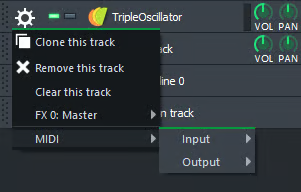
<figure><img src="/files/cAK9gLc7cIYFLYRtFTma" alt=""><figcaption><p>快速配置 MIDI</p></figcaption></figure>

这是一种将您的乐器快速连接到 MIDI 设备的方法。对于更高级的设置，请前往 MIDI 选项卡。

## MIDI 选项卡

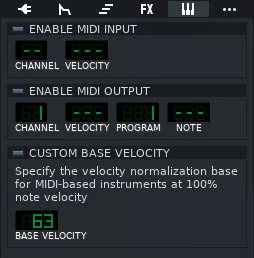
<figure><img src="/files/1S9zpi6ub9h3MuTYXQmU" alt=""><figcaption><p>插件内的 MIDI 选项卡</p></figcaption></figure>

乐器编辑器中的 MIDI 选项卡提供了一些更高级的选项。

您可以在 MIDI 选项卡部分阅读有关如何将 MIDI 设备连接到乐器的内容。

要连接到一个旋钮，请在其上右键单击，选择“连接到控制器”，确保 MIDI 控制器 和 自动控制 已点亮，然后只需移动你的 MIDI 设备上的调制轮。


---

# Agent Instructions: Querying This Documentation

If you need additional information that is not directly available in this page, you can query the documentation dynamically by asking a question.

Perform an HTTP GET request on the current page URL with the `ask` query parameter:

```
GET https://docs.lmms.io/user-manual/jian-ti-zhong-wen/bian-qu/shi-yong-midi.md?ask=<question>
```

The question should be specific, self-contained, and written in natural language.
The response will contain a direct answer to the question and relevant excerpts and sources from the documentation.

Use this mechanism when the answer is not explicitly present in the current page, you need clarification or additional context, or you want to retrieve related documentation sections.