> For the complete documentation index, see [llms.txt](https://docs.lmms.io/user-manual/llms.txt). Markdown versions of documentation pages are available by appending `.md` to page URLs; this page is available as [Markdown](https://docs.lmms.io/user-manual/jian-ti-zhong-wen/shu-xi-lmms/kong-zhi-qi-ji-jia-controller-rack.md).

# 控制器机架（Controller Rack）

控制器（Controllers）用于借助另一种信号（如 LFO 波形）来改变旋钮或其他控件的值。它们与自动化不同：自动化使用的是手动绘制的曲线形状，且通常没有重复的变化模式；而 LFO 控制器则使用波形来产生规律性的变化。

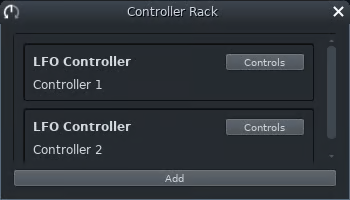
<figure><img src="/files/rcxoToorcjOOhJnweDOY" alt=""><figcaption><p>控制器机架</p></figcaption></figure>

控制器机架展示了您在工程中创建的所有控制器。

控制器有两种：

* LFO 控制器
* 峰值控制器

右键控制器会唤出上下文菜单：

1. 向上移动（Move Up）
2. 向下移动（Move Down）
3. 移除控制器（Remove the controller）
4. 重命名（Rename the controller）

你可以通过直接拖拽控制器来排序它们（不会影响输出的声音），双击控制器可以快捷重命名。

## LFO 控制器（LFO controller）

<figure><img src="/files/zMxj0C9b7vW6eyX0zIkW" alt="" width="249"><figcaption></figcaption></figure>

LFO 就是 **L**ow **F**requency **O**scillator（低频振荡器）的缩写。

使用 ![](/files/U69eyaNoCKeemvMCjyjp) 按钮或按 <kbd>F11</kbd> （在 1.3 是 <kbd>Ctrl+6</kbd> ）来显示/隐藏控制器机架。

若要编辑特定 LFO 控制器，请点击控制器右侧的 *控制* （Control）按钮。LFO 控制器设置包括：

* 八个波形的选择按钮
* 四个旋钮：
  * 基准（BASE）：波形振荡的中心（或零线）
  * 速度（SPD）波形振荡的速率（频率）。
  * 范围（AMP）：波形的大小（振幅）。
  * 相位（PHS）：相位偏移，即从波形上的哪个点开始振荡。
* 3个速度倍数选项按钮。

## 峰值控制器（Peak controller）

<figure><img src="/files/WDpN7i87aborE3zk3L1Y" alt="" width="232"><figcaption></figcaption></figure>

峰值控制器允许您利用音频源的音量峰值来自动化控制值。它与门限器（Gate）类似，但灵活性更高。峰值控制器通常使用打击乐轨道的输出信号，来控制另一条轨道的音量。这会产生一种让声音跟着打击乐器的节奏被“切碎”的效果。\
在 LMMS 中，当您添加一个峰值控制器时，它会显示在控制器机架中，但本质上它是应用于 FX 通道的一个效果器，所以您需要在效果器链中添加它。一个 FX 通道可以有多个峰值控制器。


---

# Agent Instructions
This documentation is published with GitBook. GitBook is the documentation platform designed so that both humans and AI agents can read, navigate, and reason over technical content effectively. Learn more at gitbook.com.

## Querying This Documentation
If you need additional information that is not directly available in this page, you can query the documentation dynamically by asking a question.

Perform an HTTP GET request on the current page URL with the `ask` query parameter:

```
GET https://docs.lmms.io/user-manual/jian-ti-zhong-wen/shu-xi-lmms/kong-zhi-qi-ji-jia-controller-rack.md?ask=<question>
```

The question should be specific, self-contained, and written in natural language.
The response will contain a direct answer to the question and relevant excerpts and sources from the documentation.

Use this mechanism when the answer is not explicitly present in the current page, you need clarification or additional context, or you want to retrieve related documentation sections.