> For the complete documentation index, see [llms.txt](https://docs.lmms.io/user-manual/llms.txt). Markdown versions of documentation pages are available by appending `.md` to page URLs; this page is available as [Markdown](https://docs.lmms.io/user-manual/jian-ti-zhong-wen/xiao-guo-qi-cha-jian/spectrum-analyzer-pin-pu-fen-xi-yi.md).
# Spectrum Analyzer(频谱分析仪)
## Spectrum Analyzer in 1.2 and earlier
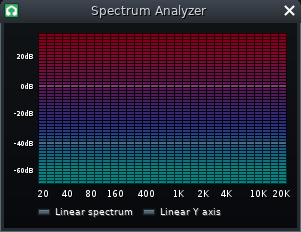
Spectrum Analyzer
This plugin visualizes the frequencies present in the signal it monitors.
### Graph
* **X axis:** shows frequencies from 20 Hz to 20,000 Hz, divided into [octaves](https://en.wikipedia.org/wiki/Octave_\(electronics\)) (this makes the X axis appear nonlinear).
* **Y axis:** shows amplitude from 40 dB to -60 dB (displayed linearly with respect to decibels).
### Buttons
* **Linear Spectrum:** toggles linear display of frequencies (rather than by octaves).
* **Linear Y axis:** toggles linear display of amplitude (rather than by decibels).
## Spectrum Analyzer in 1.3 and later
Spectrum Analyzer
* \
**Frequency Range :** alters the range of displayed frequencies.
* **Amplitude Range :** alters the range of displayed amplitude.
* **FFT Block Size :** alters the frequency resolution of the display (Higher resolutions come at the cost of FPS).
* **FFT Window Type :** changes algorithm used to remove FFT-related noise.
* Blackmann-Harris displays the least noise but has low frequency resolution.
* Rectangular displays the most noise but has high frequency resolution.
#### Graph
* **X axis:** shows frequencies based on the Frequency range drop-down menu.
* **Y axis:** shows amplitude based on the Amplitude range drop-down menu.
Clicking in the spectrum/waterfall display adds a ruler/cursor with value readouts.
#### Advanced
* **Envelope Res:** alters the resolution of the Peak envelope ("Peak Hold").
* **Spectrum Res:** alters the resolution of the display curve with fill-in color.
* **Falloff Factor:** alters the speed at which the peak envelope ("Peak Hold") falls to zero.
* **Averaging Weight:** alters how the display curve reacts to new samples.
* High value: fast reaction, low jitter reduction. enables real-time spectrogram.
* Low value: slow reaction, high jitter reduction.
* **Waterfall Height:** alters the time range, or the amount of temporarily stored frames, of displayed frequencies in the Waterfall display.
* **Waterfall Gamma:** alters the amount of gamma correction in the Waterfall display.
* **Window Overlap:** alters how many times each FFT sample is processed (higher values can help improve FPS).
* **Zero Padding:** improves resolution when using a smaller FFT Block size, at the cost of performance.